- Docs
- Account and settings
- Your plan, billing, and invoices
Your plan, billing, and invoices
See your plan and usage, update your card, download invoices, cancel or restart, and understand what happens if a payment fails.
Updated September 11, 2026
On this page
- What this is for
- Where to find it
- Your plan at a glance
- Manage your card, invoices, and cancellation
- Cancel, or take a breather instead
- Earn subscription time through referrals
- Watch your plan usage
- If a payment fails
- Common questions
- Where do I download an invoice?
- How do I switch from monthly to yearly?
- Will I lose my data if I cancel?
- Why is my website's payment setup not on this page?
What this is for
Account is where your Whelpify subscription lives: which plan you are on, how much of it you are using, your payment method, your invoices, and canceling or restarting. It is deliberately separate from Settings. Account is about your Whelpify subscription and sign-in. Settings is about your website.
Where to find it
In the left sidebar, open Account, then Account. You can also reach it from the avatar menu in the top right, under Account & Billing.
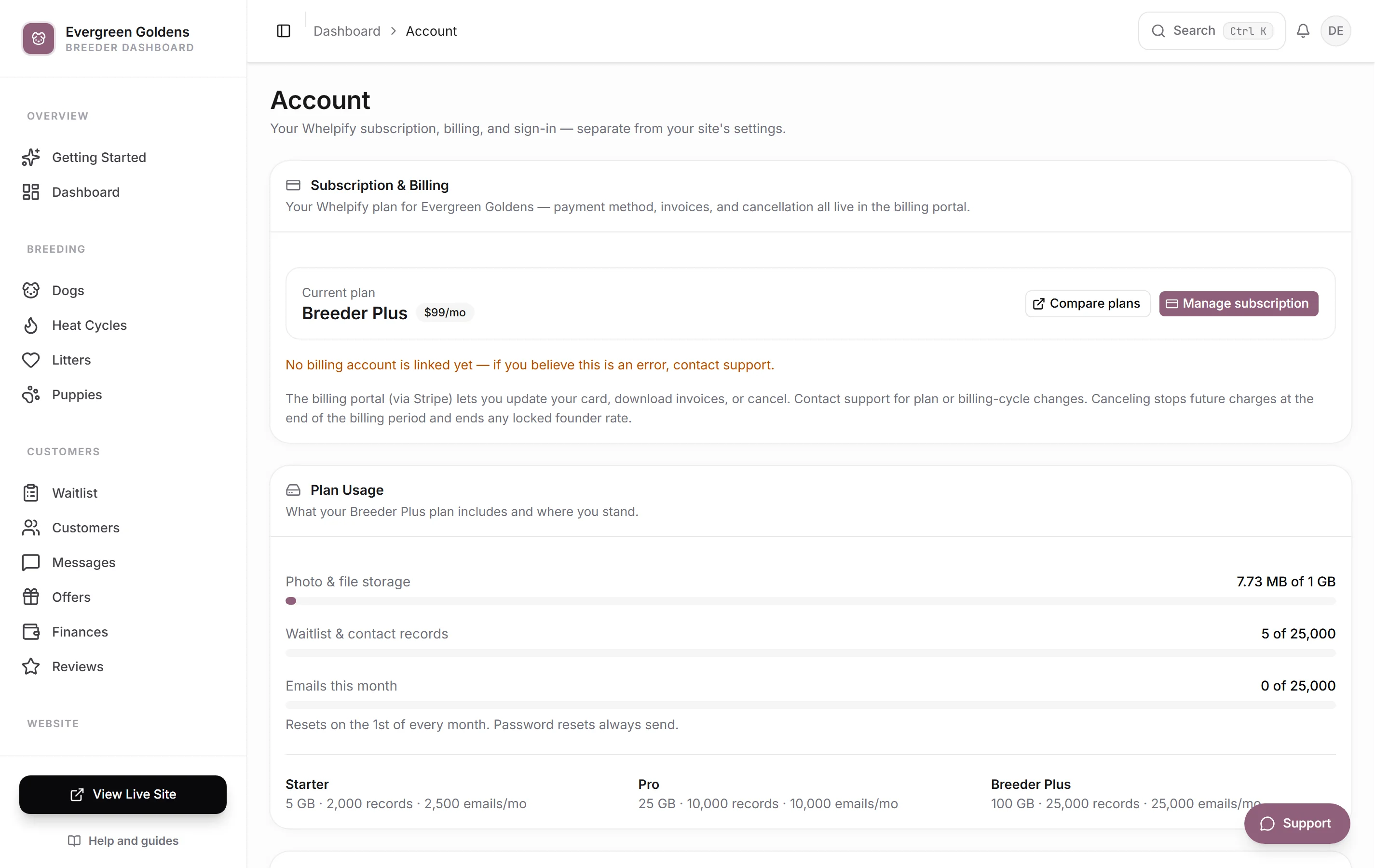
Your plan at a glance
The Subscription & Billing card shows your current plan and how you are billed, monthly or yearly. Compare plans opens the public pricing page in a new tab so you can see what each plan includes.
A banner across the top of the page tells you anything you need to know right now:
- On a free trial, it says nothing has been charged yet and gives the date of your first payment.
- If your plan is set to cancel, it gives the date and confirms you keep full access until then.
- If your subscription has already ended, it confirms your data is saved and points you to restarting.
Manage your card, invoices, and cancellation
- Click Manage subscription.
- Whelpify opens the secure billing portal, run by Stripe.
- From there you can update your payment card, download past invoices, or cancel.
- Close the portal or use its back link and you land on the Account page again.
Canceling stops future charges at the end of the period you have already paid for. You keep working right up to that date, and you can resume from the same portal if you change your mind. To change plans or to switch between monthly and yearly billing, contact support.
Cancel, or take a breather instead
You can cancel from this page, and you do not have to call anyone.
- In the Subscription and Billing card, click Cancel subscription.
- Pick the reason that fits best and, if you like, add a sentence. This is read by a real person.
- If you are still setting things up, you will usually be offered free time first: 30 more trial days, or your next month free. Take it or click No thanks, keep going.
- If price is the issue, you may see one last offer of a discount on your next payments.
- Click No thanks, cancel my subscription to finish. Your site stays online until the end of the period you already paid for, nothing is charged again, and everything is saved.
Change your mind before that date and click Resume subscription in the same card. Each free-time offer can be taken once per account.
Earn subscription time through referrals
Open Referrals to find your personal invitation link, track qualified referrals, and see earned subscription months. Ten qualified referrals unlock a lifetime subscription benefit. Read how referral rewards work for qualification and coverage details.
Watch your plan usage
The Plan Usage card has three meters:
- Photo & file storage, everything you have uploaded to your media library.
- Waitlist & contact records, the people you are tracking.
- Emails this month, which resets on the first of every month.
The meter turns amber as you get close to a limit and red once you reach it. Password resets always send, even at the limit. The list under the meters shows what each plan includes, so you can see what changes if you move up. Upgrading takes effect immediately.
If a payment fails
Nothing disappears the moment a card declines. Whelpify shows an amber banner at the top of your dashboard saying your last subscription payment did not go through, with a button to update your payment method. Your website and your dashboard keep running while the card is retried, so buyers never see a problem while you sort it out.
If the subscription eventually ends, either because you canceled or because the retries ran out, the banner turns red and your public website goes offline for visitors. Your dashboard, your dogs, your litters, your customers, and your photos are all still there, exactly as you left them. Restarting the subscription in the billing portal brings the site straight back.
You also get email about this. Notices about your own subscription, including a failed payment and a trial ending, are marked always on in the customer emails control center so a billing problem never sits silently.
Common questions
Where do I download an invoice?
In the billing portal. Click Manage subscription, then open the invoice you need.
How do I switch from monthly to yearly?
Contact support and we will move you. Plan and billing-cycle changes are not self-serve.
Will I lose my data if I cancel?
No. Everything is kept exactly as you left it. Only your public website goes offline, and restarting brings it back.
Why is my website's payment setup not on this page?
Because it is about your site, not your subscription. Stripe for buyer deposits, offline payment methods, and deposit defaults all live in site settings.
Still stuck? Email info@whelpify.com and a real person will help.