- Docs
- What your buyers see
- The customer portal: messages, offers, and payments
The customer portal: messages, offers, and payments
What a buyer sees when they sign in to your site: their application status, your message thread, puppy offers, and payments.
Updated September 2, 2026
On this page
- What this is for
- Where to find it
- How a buyer signs in
- What is on the Overview tab
- Messages, Offers, Payments, and Profile
- The emails that bring them back
- Common questions
- Does a buyer need an account before they apply?
- Can one buyer use the same account with another breeder on Whelpify?
- The buyer says their sign-in link did not work.
- Can I see the portal the way a buyer sees it?
What this is for
Every buyer who applies to you gets a private, signed-in area on your own website. It shows their application status, the message thread with you, any puppy offer, and any payment you have asked for. Knowing what is on those pages makes it much easier to answer the question you will hear most often: "where do I go to see that?"
Where to find it
Buyers reach it by adding /account to your website address. Most arrive by clicking a secure link in an email you sent, which signs them in and drops them straight on the page.
Once signed in, five tabs run across the top: Overview, Messages, Offers, Payments, and Profile.
How a buyer signs in
The sign-in page has two tabs.
- On the Password tab, the buyer enters their Email address and Password and clicks Sign in. There is a Remember me for 30 days checkbox and a Forgot? link.
- On the Email link tab, they enter their email and click Email me a sign-in link. The link works once and expires after 30 minutes.
Buyers whose accounts were created automatically from one of your forms have no password yet. On their first visit they see a banner reading Finish securing your account with an Add my password button.
What is on the Overview tab
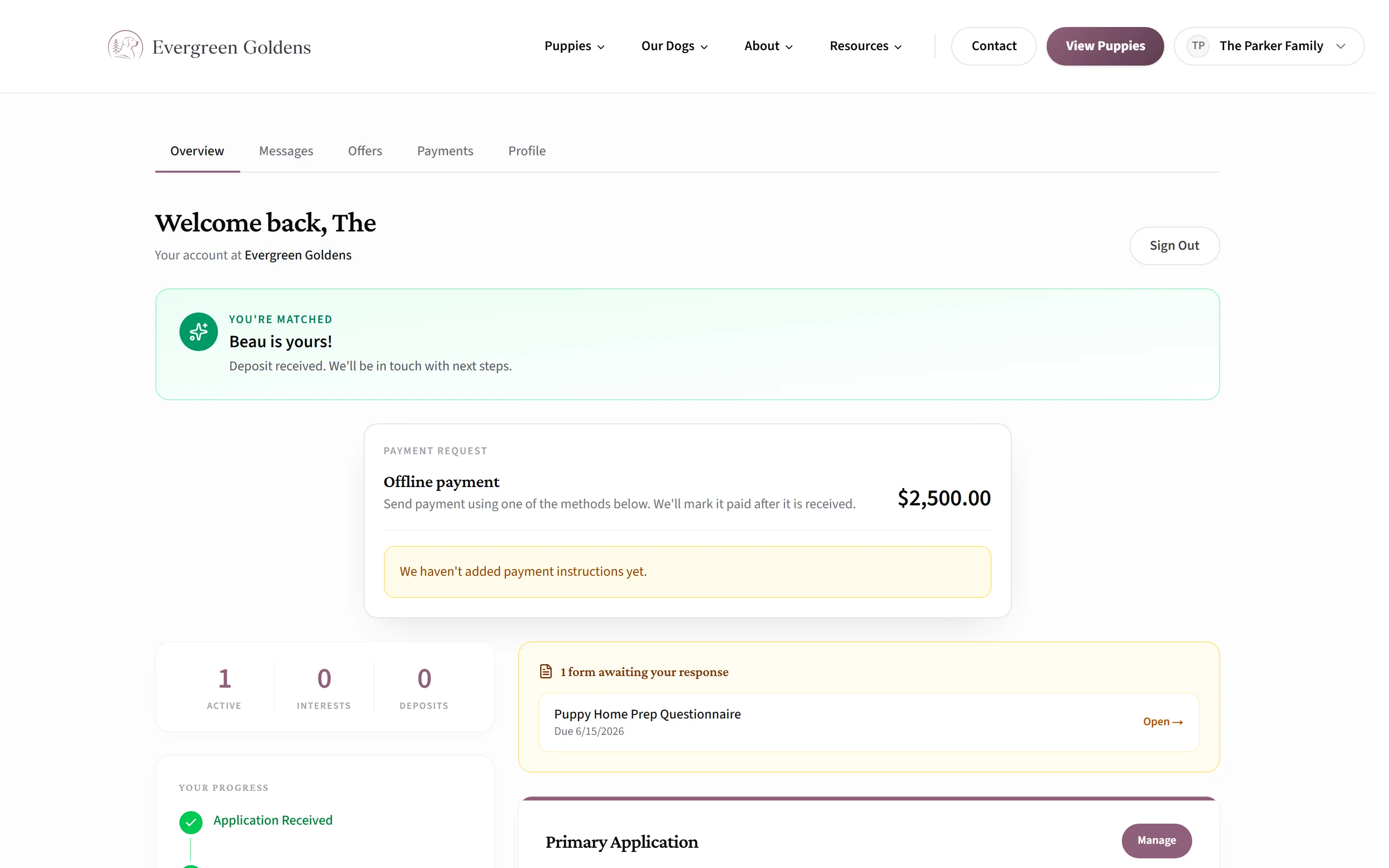
- A greeting, three counters labeled Active, Interests, and Deposits, and a Your Progress timeline that fills in as things happen: Application Received, Under Review, Approved, Puppy Offered, Deposit Paid, and Matched.
- A Primary Application card, or Waitlist Signup if you collect signups instead of applications. It carries a plain-language status badge such as Under Review, Waiting for Match, Deposit Requested, or Matched, plus one sentence explaining what that means. A Manage button opens the record so they can update their preferences.
- A panel listing any form you assigned that is still waiting on them.
- Any credits on their account, past offers, and a section called Interested Puppies & Activity.
Messages, Offers, Payments, and Profile
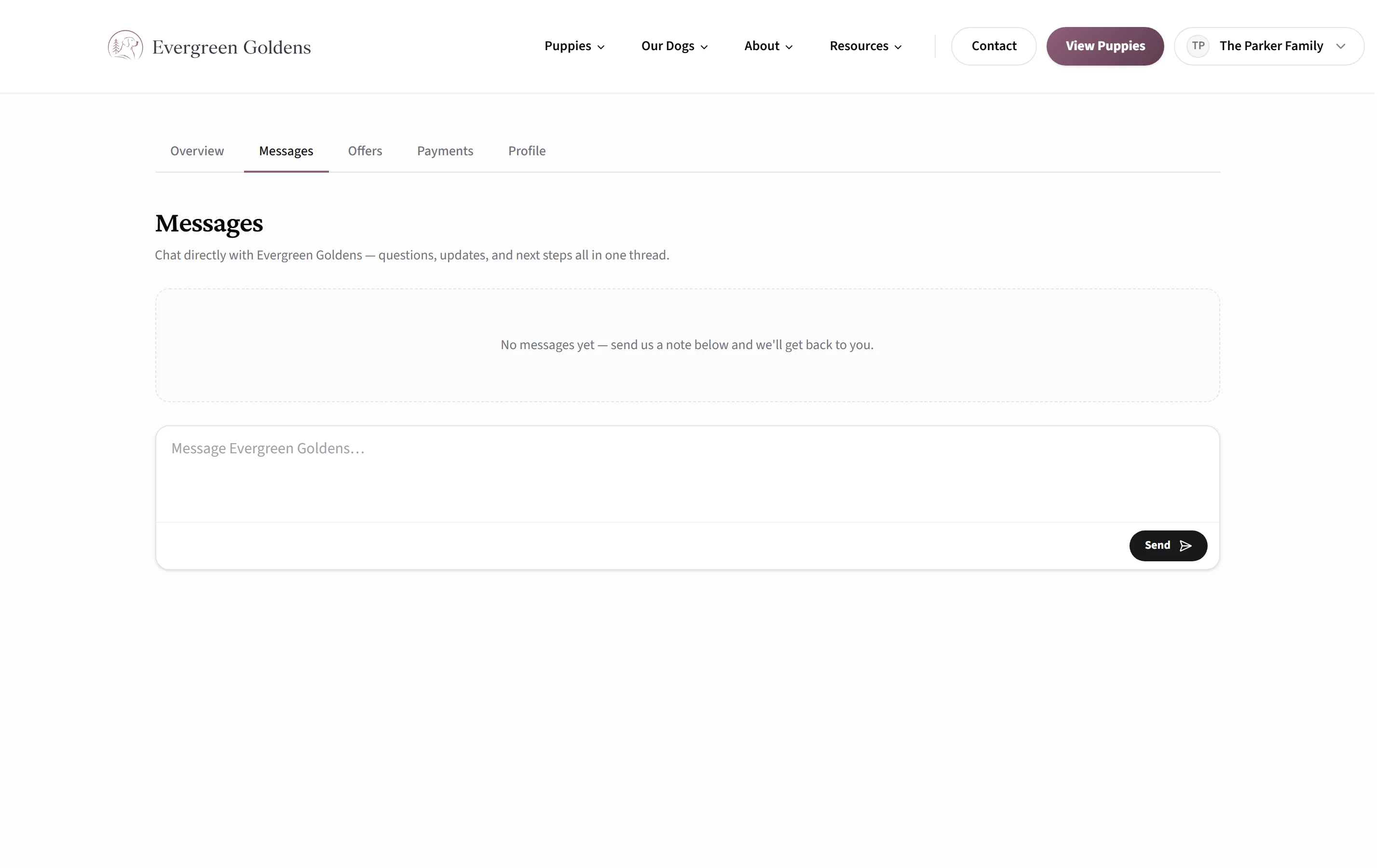
Messages is the buyer's half of the same thread you read in your dashboard. They type in the box and click Send, up to 4,000 characters per message. Contact form notes and puppy inquiries land in that same thread, so nothing is scattered. See Messages: your inbox for your side of it.
Offers lists puppy offers under Awaiting Your Response, Accepted, and Past Offers. An open offer shows the puppy, the expiry date, your deposit policy, and two buttons: Accept Match and Decline Match. Declining asks them to confirm first. Full details are in reservation offers.
Payments shows anything you have asked them to pay, active credits, and their payment history. Paying a deposit or balance walks through it.
Profile lets them change their name and phone and click Save Profile. The email address is shown but cannot be edited there. Below that, Sign-in security lets them set or replace their password.
The emails that bring them back
Almost everything in the portal has an email behind it: we got your application, a message from you, a puppy offer, a status change, a form to fill out, a payment request. Every one of them shows your kennel name as the sender, is signed with your kennel name, and sends replies to the contact email in your site settings, so it reads as your correspondence and not as a notice from a software company. Two exceptions send replies to an unmonitored address on purpose: the secure sign-in link and the "you have a new message" alert, which tells the buyer to reply inside their account instead. You can reword or switch most of them off in the customer emails control center.
Common questions
Does a buyer need an account before they apply?
No. When someone submits your application, waitlist signup, or contact form, an account is created for them and they get an email with a secure link into it.
Can one buyer use the same account with another breeder on Whelpify?
Yes. An account is tied to the buyer's email address, and it can belong to more than one breeder. When they apply to a second breeder, that breeder is added to the same account. They still sign in separately on each breeder's website, and you only ever see your own records and your own message thread.
The buyer says their sign-in link did not work.
Those links expire after 30 minutes and can only be used once. Ask them to request a fresh one from the Email link tab on your sign-in page.
Can I see the portal the way a buyer sees it?
Not from inside your dashboard. Open your public site in a private browser window and sign in with a test email address instead.
Still stuck? Email info@whelpify.com and a real person will help.