- Docs
- Getting started
- Welcome to your Whelpify dashboard
Welcome to your Whelpify dashboard
A tour of the dashboard: the sidebar, the top bar, and the home page that tells you what needs you today.
Updated September 27, 2026
On this page
What this is for
Your dashboard is where you manage your website and breeding program. Published pages and listings appear on your website. Account settings and internal notes stay private. This guide shows you where to find the tools you need.
Where to find it
Go to your Whelpify address and sign in. The first page you land on is your dashboard home.
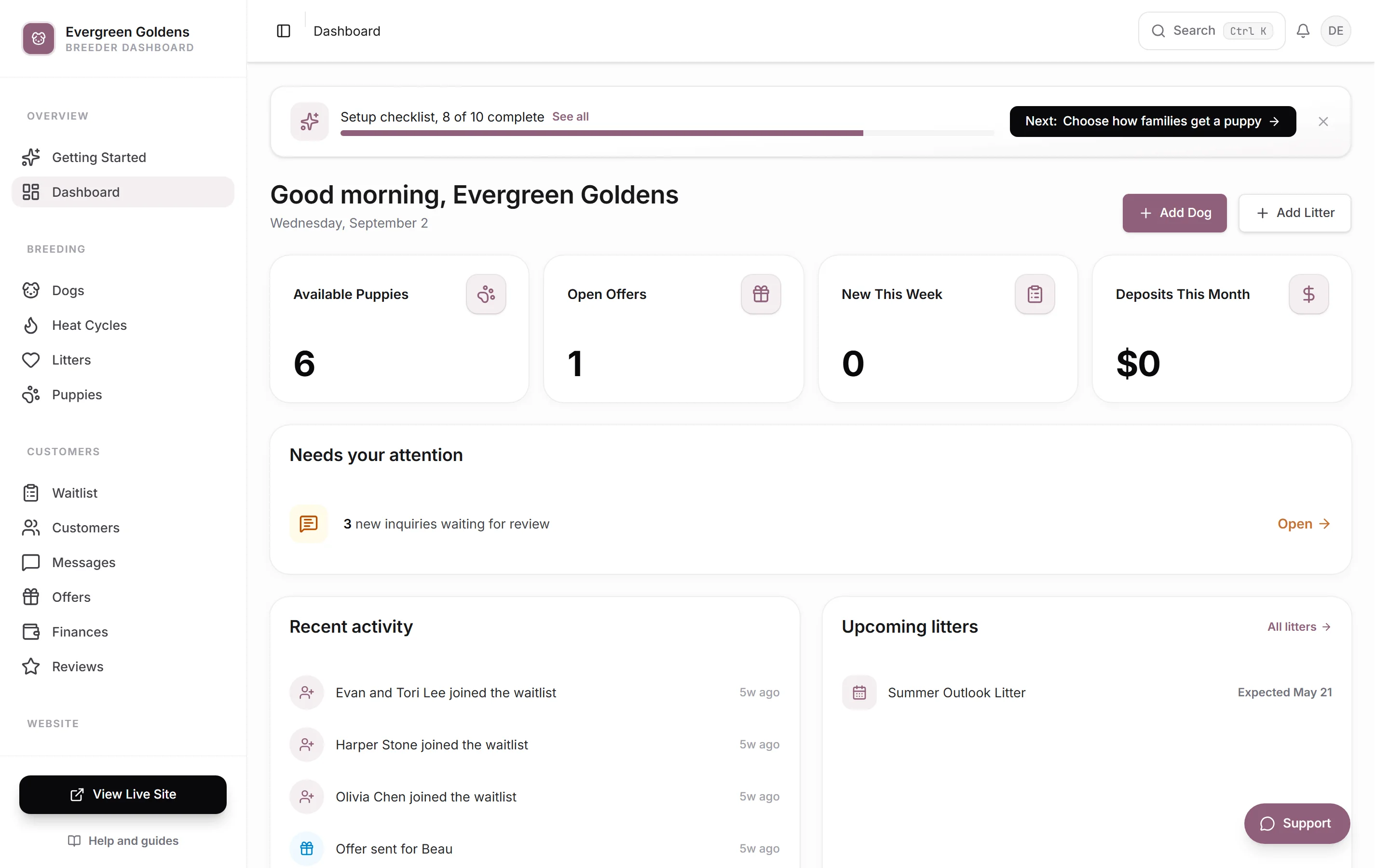
The sidebar down the left
The main menu keeps your everyday work close:
- Today shows what needs your attention.
- Puppies manages your puppy listings and availability.
- Dogs holds your parents, photos, health details, and pedigrees.
- Website brings together your pages, photos, design, and domain.
- Messages holds buyer conversations.
- More has the rest of your tools, grouped and searchable.
You can pin tools from More to keep them in your menu. Those choices are saved on your account, so they follow you between devices. Relevant shortcuts may appear as your program grows. While setup is unfinished, Website setup or Getting Started also appears near the top.
At the very bottom is View live site, which opens your public website in a new tab so you can check your work as a visitor would see it. There is a full walkthrough of that view in a tour as a buyer sees it.
The bar across the top
- Search opens a command menu of every page and quick action. You can also press Ctrl and K together.
- The bell shows your alerts, with a count when something is unread. See notifications and what they mean.
- Your initials open a small menu with Account & Billing, Site Settings, View Site, and Log Out.
Your dashboard home
The home page greets you by kennel name and gives you the day at a glance.
- Add Dog and Add Litter sit at the top right for the two things you add most.
- The cards below them count Available Puppies, Open Offers, New This Week, and Deposits This Month.
- Needs your attention lists anything waiting on you: girls in heat, new inquiries, applications to review, offers expiring soon, and litters ready to publish. Each row links straight to the right page.
- Follow-ups due appears when you have set a follow-up date on a waitlist family and that date has arrived.
- Recent activity and Upcoming litters fill the bottom row.
If Needs your attention says you are all caught up, there is genuinely nothing waiting.
Getting help
Open Support in the top bar. On common pages, you will see a short guide for the task you are working on. Choose Message Aidan to ask for help directly. Replies go to the email address you sign in with. The guides and message form work even if you do not allow analytics.
Common questions
Do I have to finish everything before my website goes live?
No. Follow the setup steps shown in your dashboard and check your pages before publishing. Once your website is published, you can keep adding dogs, puppies, photos, and other details. If you are reviewing a custom website preview, follow the approval steps in your preview first. Your first week suggests a sensible order.
Can I use this on my phone?
Yes. On a phone the sidebar is replaced by a bar along the bottom of the screen. See using Whelpify on your phone.
Why does my sidebar look different from a friend's?
The links follow how you sell. Inquiry-only kennels do not see Offers, and the setup link at the top disappears once your setup is finished.
Still stuck? Email info@whelpify.com and a real person will help.