- Docs
- Payments and finances
- Refunds and customer credits
Refunds and customer credits
Give a deposit back, keep it as a credit toward a future puppy, or keep it entirely, and record what you decided.
Updated September 2, 2026
On this page
- What this is for
- Where to find it
- Cancel the offer and settle the deposit
- Your choices
- What happens after you confirm
- Where credits live
- Set the policy behind these options
- Common questions
- Can I refund from the Finances page?
- How long does the money take to reach the buyer?
- I cancelled an offer but do not want to refund yet. What do I choose?
- Does a credit expire?
What this is for
Sometimes a family backs out, or you decide a puppy is not the right match. This is how you close out the reservation and settle the deposit, whether you refund it, turn it into a credit, or keep it.
Where to find it
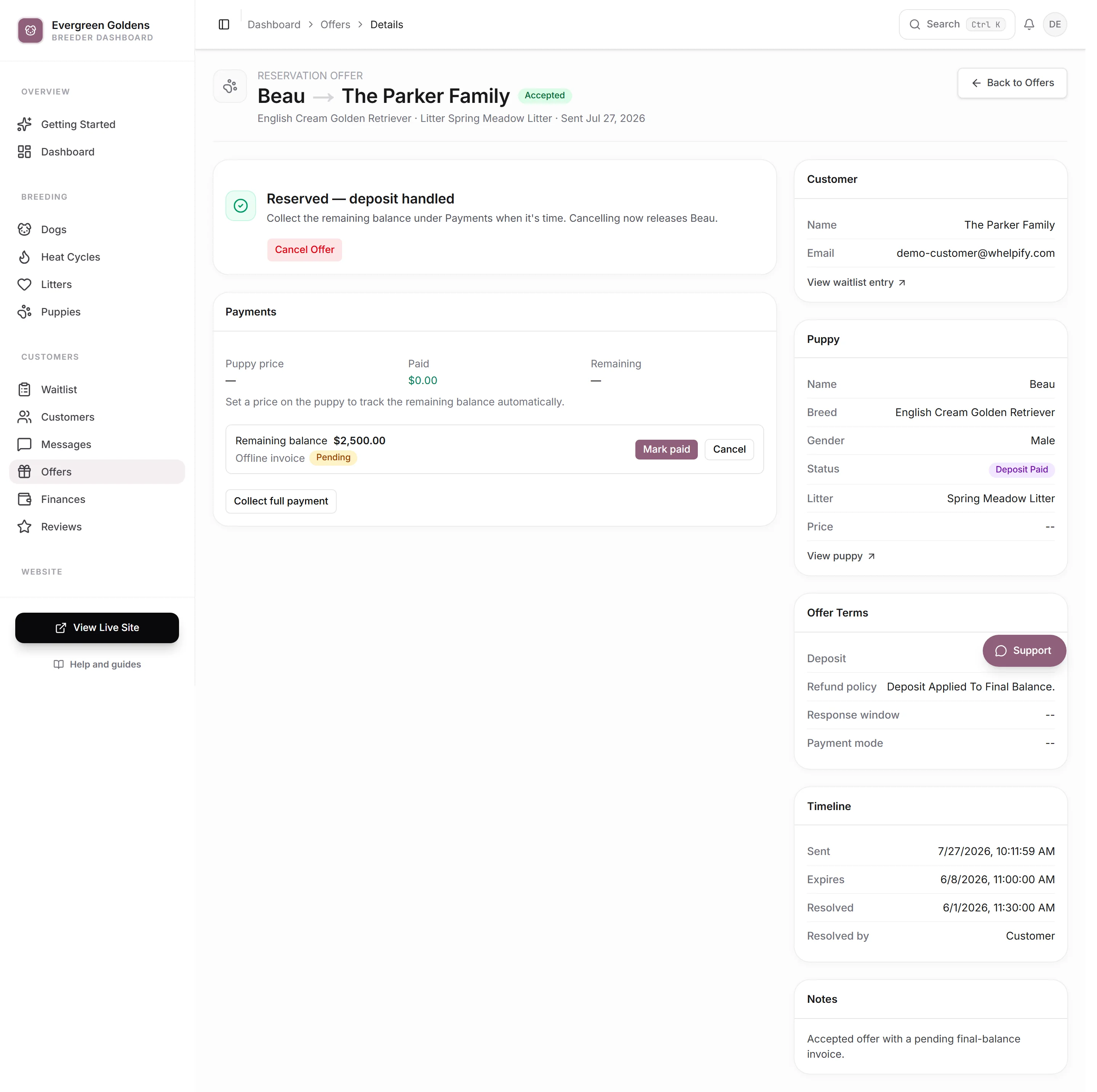
Refunds happen on the offer, not on the payment. In the left sidebar, under Customers, open Offers, then open the offer.
Cancel the offer and settle the deposit
- Open Offers, then the offer.
- Click Cancel & Handle Deposit. If no money was collected, the button says Cancel Offer and there is nothing to settle.
- Choose what happens to the money.
- Add a Reason if you want one on the record.
- Click Process Cancellation.
Your choices
Which options appear depends on the refund and transfer policy that applied when the offer was made.
- Full Refund sends the whole deposit back.
- Partial Refund sends part of it back. Enter the Refund Amount ($), which cannot be more than the deposit.
- Credit to Future Litter turns the money into a credit that family can use on a later litter.
- Credit to Any Puppy does the same, usable on any puppy you have available.
- Forfeit Deposit (Non-Refundable) keeps the money. This one is always offered, and it cannot be undone.
If your policy is non-refundable, the refund choices are hidden. If it is set to your discretion, you get the full set.
What happens after you confirm
Whelpify does several things at once.
- A Stripe refund goes back to the card through your own connected account.
- Any request still waiting on that offer, such as an unpaid balance invoice, is cancelled so nobody can pay toward a dead reservation.
- The puppy goes back to Available and is no longer assigned.
- The family's waitlist entry goes back to active, so they stay in line for the next one.
- The offer is marked cancelled with your reason saved on it.
- The family gets an email from your kennel telling them the refund was processed, or that they now have a credit.
Where credits live
A credit is attached to the customer, not to a puppy.
You see it on their customer record under Active credits. The family sees it in their account on your site under Active Credits, with the amount and whether it is good for a future litter or any puppy.
Credits are a record of what you owe that family, not an automatic discount. When they take a puppy, subtract the credit yourself and request the reduced amount. See Deposits, balances, and payment requests.
Set the policy behind these options
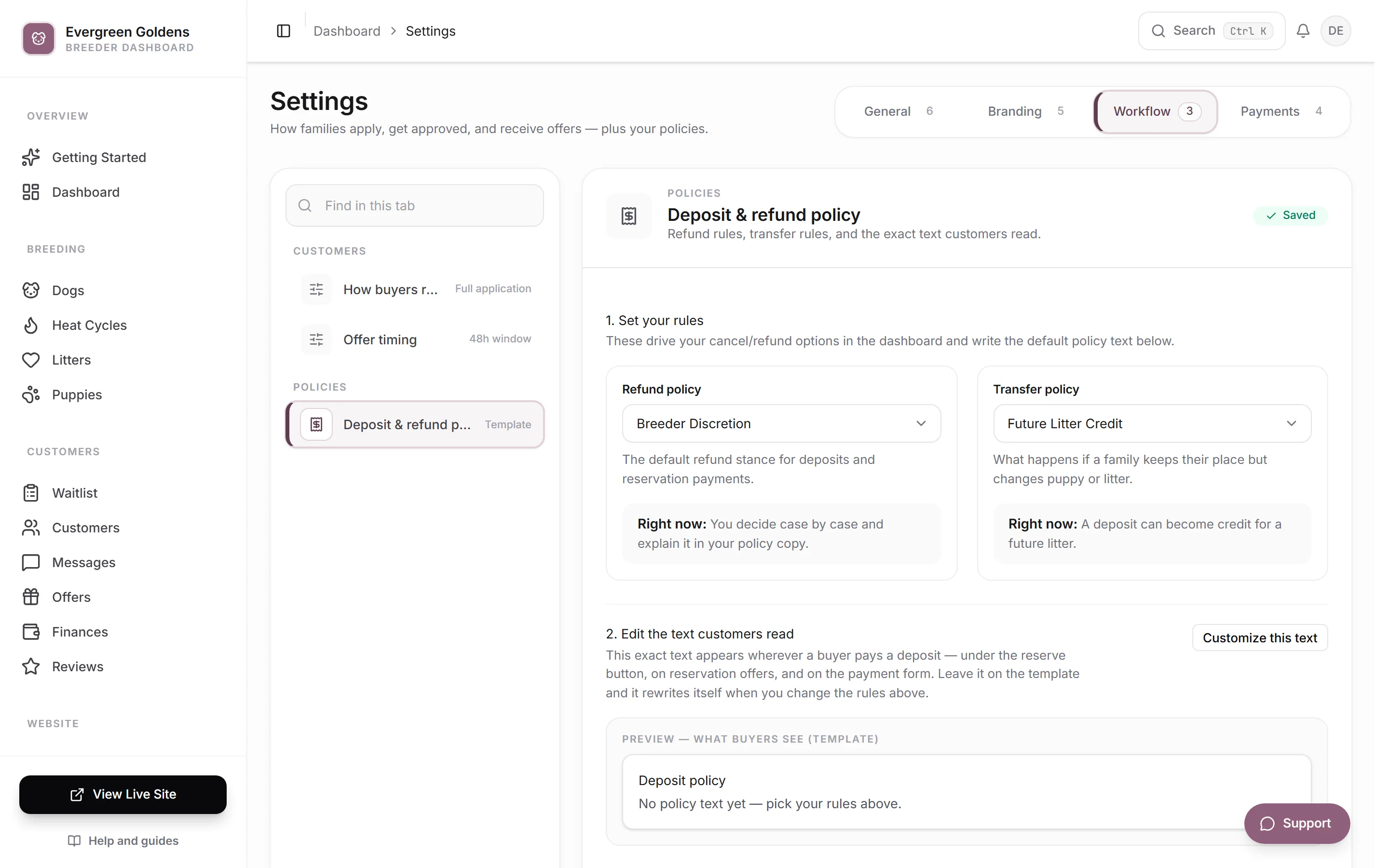
- Open Settings, then the Workflow tab, then Deposit & refund policy.
- Pick a Refund policy of Non-Refundable, Partial Refund, Full Refund, or Breeder Discretion.
- Pick a Transfer policy of Not Transferable, Future Litter Credit, or Any Puppy Credit.
- Below that, review the exact wording buyers read before they pay. Leave it on the template and it rewrites itself when you change the rules, or write your own.
Changing the policy affects new offers. Offers you already sent keep the terms the buyer agreed to.
Common questions
Can I refund from the Finances page?
No. Find the offer that payment belongs to and cancel it there. The payment record on Finances links to its offer under Related.
How long does the money take to reach the buyer?
That is up to Stripe and the buyer's bank, and it is usually several business days. Check the refund in your Stripe dashboard if you need details.
I cancelled an offer but do not want to refund yet. What do I choose?
Pick Forfeit Deposit (Non-Refundable) only if you truly intend to keep it. If you want to decide later, hold off on cancelling and talk to the family first, since cancelling releases the puppy right away.
Does a credit expire?
Not on its own. It stays on the customer record until you use it up, so keep an eye on your list of active credits.
Still stuck? Email info@whelpify.com and a real person will help.